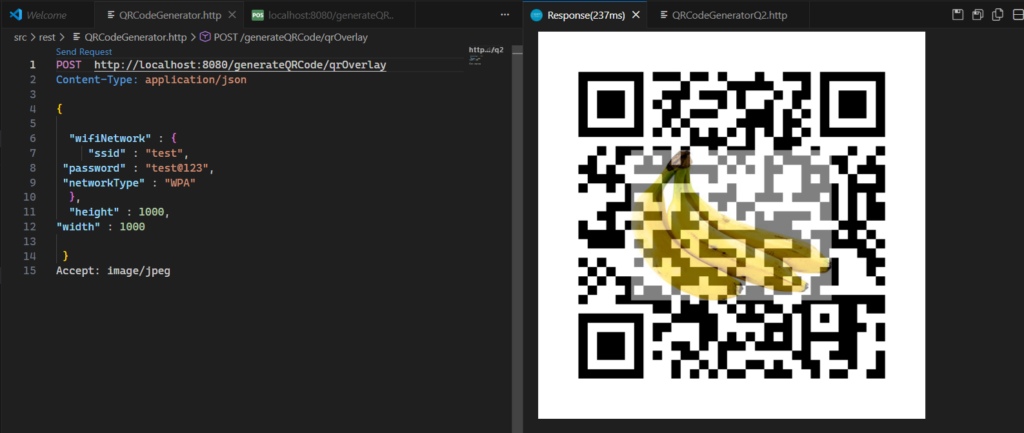
Generating QR Code In SpringBoot Application
In this blog we will look at the generating QR Code in Spring Boot Application.
QR code (short for “quick-response code“) typically contains data for a location, contact information , and website.
Let’s try to generate QR code for Wifi network so that you can share the Wifi details with your guests with out revealing the password.
QR code for Wifi network contains following string format.
“WIFI:S:<SSID>;T:<Network-Type>;P:<Password>;;”
In our API, we will accept ssid, networkType and Password details and generate the QR code.
Set up a new Spring Boot Project:
Go to start.spring.io project and create new spring boot projects
Add Dependencies for QR Code Generation
Add zxing QRCode Generator library to your project.
<dependency>
   <groupId>com.google.zxing</groupId>
   <artifactId>core</artifactId>
   <version>3.5.2</version>
</dependency>
Code language: Java (java)
Create a Service class that generates the QR code
From zxing library you can use either of the following 2 classes to generate QR code.
- QRWriter
- MultiFormatWriter
For the following first example let’s use the QRWriter class.
@SpringBootApplication
public class Application {

	public static void main(String[] args) {
		SpringApplication.run(Application.class, args);
	}

	@Bean
	public QRCodeWriter getQrCodeWriter(){
		return new QRCodeWriter();
	}

	@Bean
	public MultiFormatWriter getMultiFormatWriter(){
		return new MultiFormatWriter();
	}

}
@Service
public class QRCodeGeneratorService {
@Autowired QRCodeWriter qrCodeWriter;
@Autowired MultiFormatWriter multiFormatWriter;
public byte[] generateQRCode(WifiNetwork wifiNetwork,int width,int height) throws WriterException {
Map<EncodeHintType, Object> hints = new HashMap<>();
hints.put(EncodeHintType.CHARACTER_SET, "UTF-8");
hints.put(EncodeHintType.ERROR_CORRECTION, ErrorCorrectionLevel.L);
BitMatrix bitMatrix = qrCodeWriter.encode(wifiNetwork.getWifiNetworkString(),
BarcodeFormat.QR_CODE, 200, 200,
hints);
BufferedImage qrCodeImage = getBufferedImage(width, height, bitMatrix);
ByteArrayOutputStream outputStream = new ByteArrayOutputStream();
try {
ImageIO.write(qrCodeImage, "png", outputStream);
} catch (IOException e) {
throw new RuntimeException("Failed to write QR code image to output stream.", e);
}
return outputStream.toByteArray();
}
private static BufferedImage getBufferedImage(int width, int height, BitMatrix bitMatrix) {
BufferedImage qrCodeImage = new BufferedImage(width, height, BufferedImage.TYPE_INT_RGB);
qrCodeImage.createGraphics();
Graphics2D graphics = (Graphics2D) qrCodeImage.getGraphics();
graphics.setColor(Color.WHITE);
graphics.fillRect(0, 0, width, height);
graphics.setColor(Color.BLACK);
for (int i = 0; i < width; i++) {
for (int j = 0; j < height; j++) {
if (bitMatrix.get(i, j)) {
graphics.fillRect(i, j, 1, 1);
}
}
}
return qrCodeImage;
}
}QRCodeWriter -> encode method generates BitMatrix which contains one’s and zeros.
The data from BitMatrix is used to generate an Image containing the QR Code.
The getBufferedImage() method first creates a new BufferedImage object with the specified width, height, and image type. It then creates a Graphics2D object from the BufferedImage object.
The method then sets the color of the Graphics2D object to white and fills the entire image with white. This will create a blank white canvas for the QR code.
Next, the method sets the color of the Graphics2D object to black. It then iterates over the BitMatrix object, drawing a black pixel at each coordinate where the BitMatrix object is set to true.
Finally, the method returns the BufferedImage object.
Now let’s test the generation of QRCode
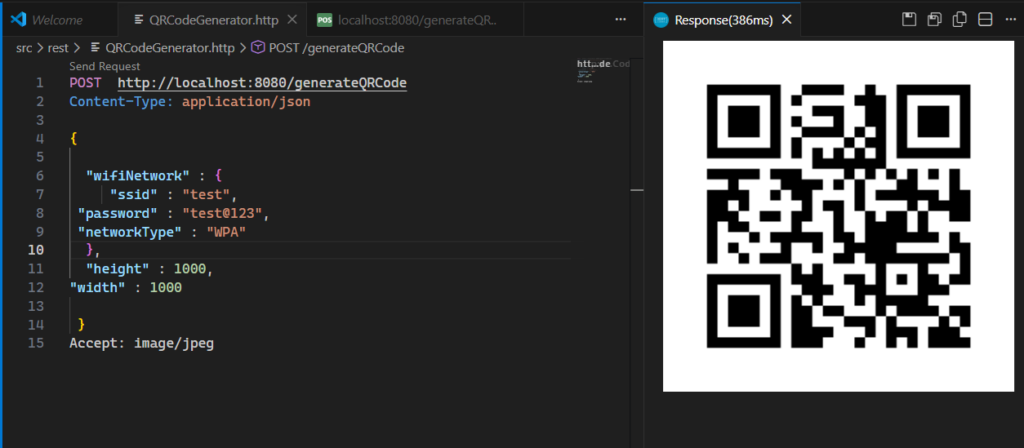
Note: I have used, Rest Client for VS Code extension for testing.
Error Correction
QR Code has error correction capability to restore data if the code is dirty or damaged. Four error correction levels are available for users to choose according to the operating environment. Raising this level improves error correction capability but also increases the amount of data QR Code size.
To select error correction level, various factors such as the operating environment and QR Code size need to be considered
| QR Error Code | Correction Capability |
| LEVEL L | Approx. 7% |
| LEVEL M | Approx. 15% |
| LEVEL Q | Approx. 25% |
| LEVEL H | Approx. 30% |
QRCodeWriter class can be replaced with MultiFormatWriter. Internally MultiFormatWriter class uses QRCodeWriter when we pass QRCode as barcode format.
In your application, if you are dealing with more than one barcode format, using MultiFormatWriter class is preferred.
public byte[] generateQRCode2(WifiNetwork wifiNetwork,int width,int height) throws WriterException {

    Map<EncodeHintType, Object> hints = new HashMap<>();
    hints.put(EncodeHintType.CHARACTER_SET, "UTF-8");
    hints.put(EncodeHintType.ERROR_CORRECTION, ErrorCorrectionLevel.L);

    BitMatrix bitMatrix = multiFormatWriter.encode(wifiNetwork.getWifiNetworkString(),
            BarcodeFormat.QR_CODE, 200, 200,
            hints);

    BufferedImage qrCodeImage = getBufferedImage(width, height, bitMatrix);

    ByteArrayOutputStream outputStream = new ByteArrayOutputStream();
    try {
      ImageIO.write(qrCodeImage, "png", outputStream);
    } catch (IOException e) {
      throw new RuntimeException("Failed to write QR code image to output stream.", e);
    }

    return outputStream.toByteArray();
  }
In above examples we have written our own code to generate QRCode BufferedImage.
If we include following library ,we can use utility methods which simplifies the generating QRCode.
<dependency>
   <groupId>com.google.zxing</groupId>
   <artifactId>javase</artifactId>
   <version>3.5.2</version>
</dependency>Code language: Java (java)
The library provides MatrixToImageWriter class which contains utility functions to convert BitMatrix to Image or Stream of Image or write Image to path.
public byte[] generateQRCode4(WifiNetwork wifiNetwork, int width, int height)
          throws WriterException, IOException {


    Map<EncodeHintType, Object> hints = new HashMap<>();
    hints.put(EncodeHintType.CHARACTER_SET, "UTF-8");
    hints.put(EncodeHintType.ERROR_CORRECTION, ErrorCorrectionLevel.L);

    BitMatrix bitMatrix = qrCodeWriter.encode(wifiNetwork.getWifiNetworkString(),
            BarcodeFormat.QR_CODE, 200, 200,
            hints);

    ByteArrayOutputStream outputStream = new ByteArrayOutputStream();
    MatrixToImageWriter.writeToStream(bitMatrix,"PNG",outputStream);


    return outputStream.toByteArray();
  }
Fun with QR Codes
Generating Colorful QR Codes
Generally QRCodes comes in black and white format. But we can make them colorful replacing black color with another color.
 Graphics2D graphics = (Graphics2D) qrCodeImage.getGraphics();
    graphics.setColor(Color.WHITE);
    graphics.fillRect(0, 0, width, height);
    graphics.setColor(Color.GREEN);
By setting the fill color to green instead of black, we can generate QRCode with green color that looks different from usual.